优化工具
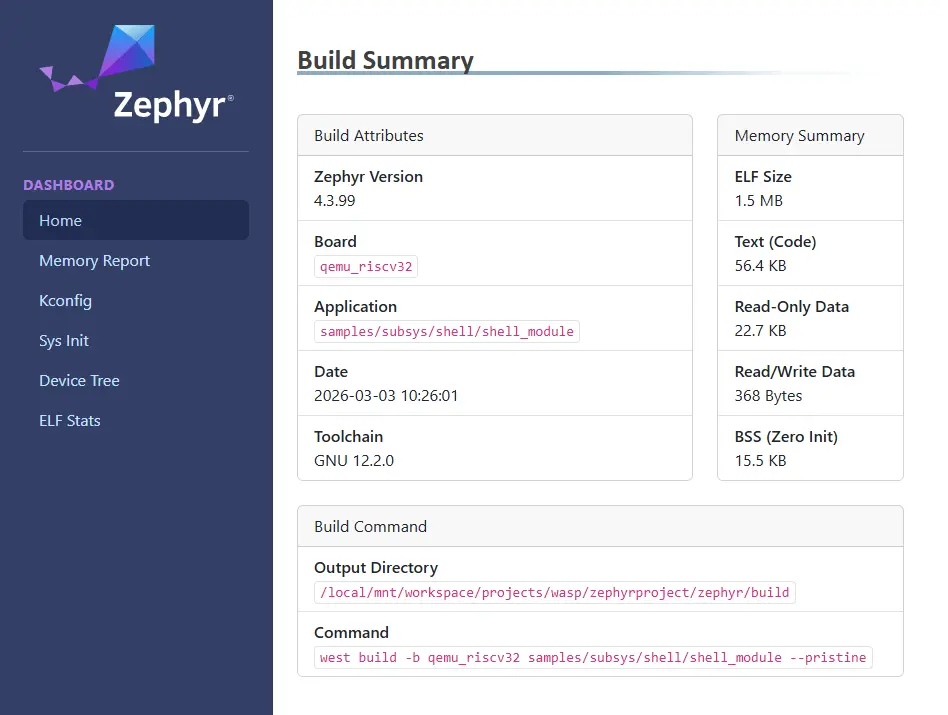
可用的优化工具通过不同构建系统目标分析 占用空间与内存使用 和 数据结构。还可生成 HTML 仪表盘,以更灵活的交互方式查看构建产物和指标。
占用空间与内存使用
构建系统提供 3 个目标,用于查看和分析生成镜像中的 RAM、ROM 和栈使用情况。这些工具针对最终镜像运行,提供 RAM 和 ROM 中符号大小及代码占用信息。此外,还可借助编译器功能生成最坏情况下的栈使用分析。
本节介绍的某些工具根据符号的物理组织方式排列输出。部分符号可能位于项目目录树之外,或缺少按名称显示所需的元数据,因此使用以下顶层容器对它们分组:
Hidden:RAM 和 ROM 报告将所有找不到匹配映射文件的待处理符号列入 Hidden 类别。
这表示对应符号的文件未加入元数据文件、为空或未定义。工具既无法获取该符号的函数名称,也无法识别其来源。
No paths:RAM 和 ROM 报告将所有带相对路径的待处理符号列入 No paths 类别。
这表示无法根据绝对路径,将所列符号归入报告树结构中的某个具体文件。工具能获取函数名称,但无法识别其来源。
备注
同一函数可能出现多次,No paths 类别会将它们合并为一个条目,列出总占用。
构建目标:ram_report
以表格形式列出所有已编译对象及其 RAM 占用,包括每个符号的字节数和占比。数据按对象在目录树中的文件系统位置及包含符号的文件分组。
针对所用开发板使用 ram_report 目标,如下例所示。如果使用 Sysbuild (System build),请参见 Dedicated image build targets。
Using west:
# From the root of the zephyr repository
west build -b reel_board samples/hello_world
west build -t ram_report
Using CMake and ninja:
# From the root of the zephyr repository
# Use cmake to configure a Ninja-based buildsystem:
cmake -Bbuild -GNinja -DBOARD=reel_board samples/hello_world

# Now run the build tool on the generated build system:
ninja -Cbuild ram_report
这些命令生成的输出类似于:
Path                                                           Size    %      Address
========================================================================================
Root                                                           4637 100.00%  -
├── (hidden)                                                      4   0.09%  -
├── (no paths)                                                 2748  59.26%  -
│   ├── _cpus_active                                              4   0.09%  0x20000314
│   ├── _kernel                                                  32   0.69%  0x20000318
│   ├── _sw_isr_table                                           384   8.28%  0x00006474
│   ├── cli.1                                                    16   0.35%  0x20000254
│   ├── on.2                                                      4   0.09%  0x20000264
│   ├── poll_out_lock.0                                           4   0.09%  0x200002d4
│   ├── z_idle_threads                                          128   2.76%  0x20000120
│   ├── z_interrupt_stacks                                     2048  44.17%  0x20000360
│   └── z_main_thread                                           128   2.76%  0x200001a0
├── WORKSPACE                                                   184   3.97%  -
│   └── modules                                                 184   3.97%  -
│       └── hal                                                 184   3.97%  -
│           └── nordic                                          184   3.97%  -
│               └── nrfx                                        184   3.97%  -
│                   └── drivers                                 184   3.97%  -
│                       └── src                                 184   3.97%  -
│                           ├── nrfx_clock.c                      8   0.17%  -
│                           │   └── m_clock_cb                    8   0.17%  0x200002e4
│                           ├── nrfx_gpiote.c                   132   2.85%  -
│                           │   └── m_cb                        132   2.85%  0x20000060
│                           ├── nrfx_ppi.c                        4   0.09%  -
│                           │   └── m_channels_allocated          4   0.09%  0x200000e4
│                           └── nrfx_twim.c                      40   0.86%  -
│                               └── m_cb                         40   0.86%  0x200002ec
└── ZEPHYR_BASE                                                1701  36.68%  -
    ├── arch                                                      5   0.11%  -
    │   └── arm                                                   5   0.11%  -
    │       └── core                                              5   0.11%  -
    │           ├── mpu                                           1   0.02%  -
    │           │   └── arm_mpu.c                                 1   0.02%  -
    │           │       └── static_regions_num                    1   0.02%  0x20000348
    │           └── tls.c                                         4   0.09%  -
    │               └── z_arm_tls_ptr                             4   0.09%  0x20000240
    ├── drivers                                                 258   5.56%  -
    │   ├── ...                                                 ...    ...%
========================================================================================
                                                               4637
构建目标:rom_report
以表格形式列出所有已编译对象及其 ROM 占用,包括每个符号的字节数和占比。数据按对象在目录树中的文件系统位置及包含符号的文件分组。
针对所用开发板使用 rom_report 目标,如下例所示。如果使用 Sysbuild (System build),请参见 Dedicated image build targets。
Using west:
# From the root of the zephyr repository
west build -b reel_board samples/hello_world
west build -t rom_report
Using CMake and ninja:
# From the root of the zephyr repository
# Use cmake to configure a Ninja-based buildsystem:
cmake -Bbuild -GNinja -DBOARD=reel_board samples/hello_world

# Now run the build tool on the generated build system:
ninja -Cbuild rom_report
这些命令生成的输出类似于:
Path                                                           Size    %      Address
========================================================================================
Root                                                          27828 100.00%  -
├── ...                                                         ...    ...%
└── ZEPHYR_BASE                                               13558  48.72%  -
    ├── arch                                                   1766   6.35%  -
    │   └── arm                                                1766   6.35%  -
    │       └── core                                           1766   6.35%  -
    │           ├── cortex_m                                   1020   3.67%  -
    │           │   ├── fault.c                                 620   2.23%  -
    │           │   │   ├── bus_fault.constprop.0               108   0.39%  0x00000749
    │           │   │   ├── mem_manage_fault.constprop.0        120   0.43%  0x000007b5
    │           │   │   ├── usage_fault.constprop.0              84   0.30%  0x000006f5
    │           │   │   ├── z_arm_fault                         292   1.05%  0x0000082d
    │           │   │   └── z_arm_fault_init                     16   0.06%  0x00000951
    │           │   ├── ...                                     ...    ...%
    ├── boards                                                   32   0.11%  -
    │   └── arm                                                  32   0.11%  -
    │       └── reel_board                                       32   0.11%  -
    │           └── board.c                                      32   0.11%  -
    │               ├── __init_board_reel_board_init              8   0.03%  0x000063e4
    │               └── board_reel_board_init                    24   0.09%  0x00000ed5
    ├── build                                                   194   0.70%  -
    │   └── zephyr                                              194   0.70%  -
    │       ├── isr_tables.c                                    192   0.69%  -
    │       │   └── _irq_vector_table                           192   0.69%  0x00000040
    │       └── misc                                              2   0.01%  -
    │           └── generated                                     2   0.01%  -
    │               └── configs.c                                 2   0.01%  -
    │                   └── _ConfigAbsSyms                        2   0.01%  0x00005945
    ├── drivers                                                6282  22.57%  -
    │   ├── ...                                                 ...    ...%
========================================================================================
                                                              21652
构建目标:ram_plot/rom_plot
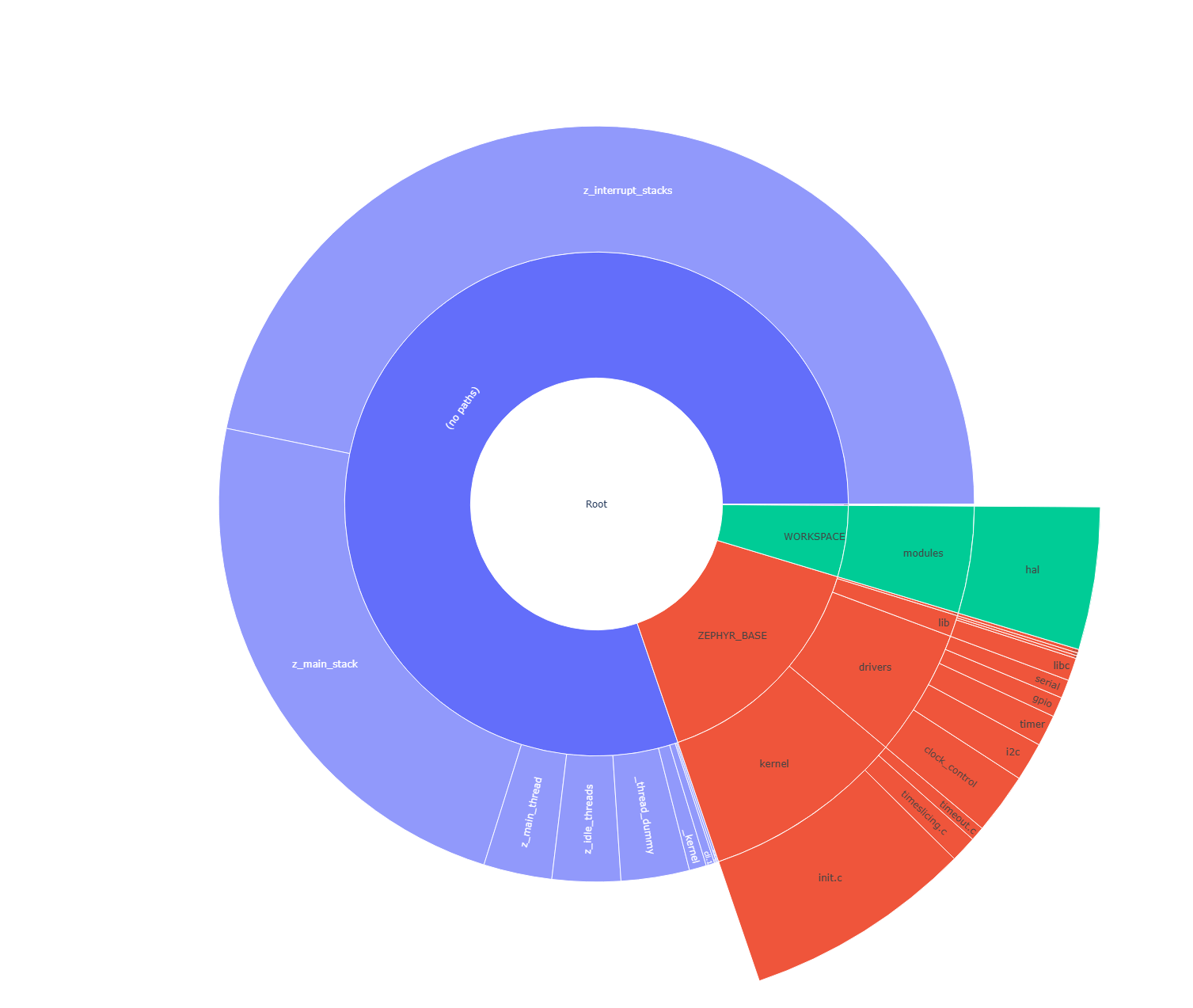
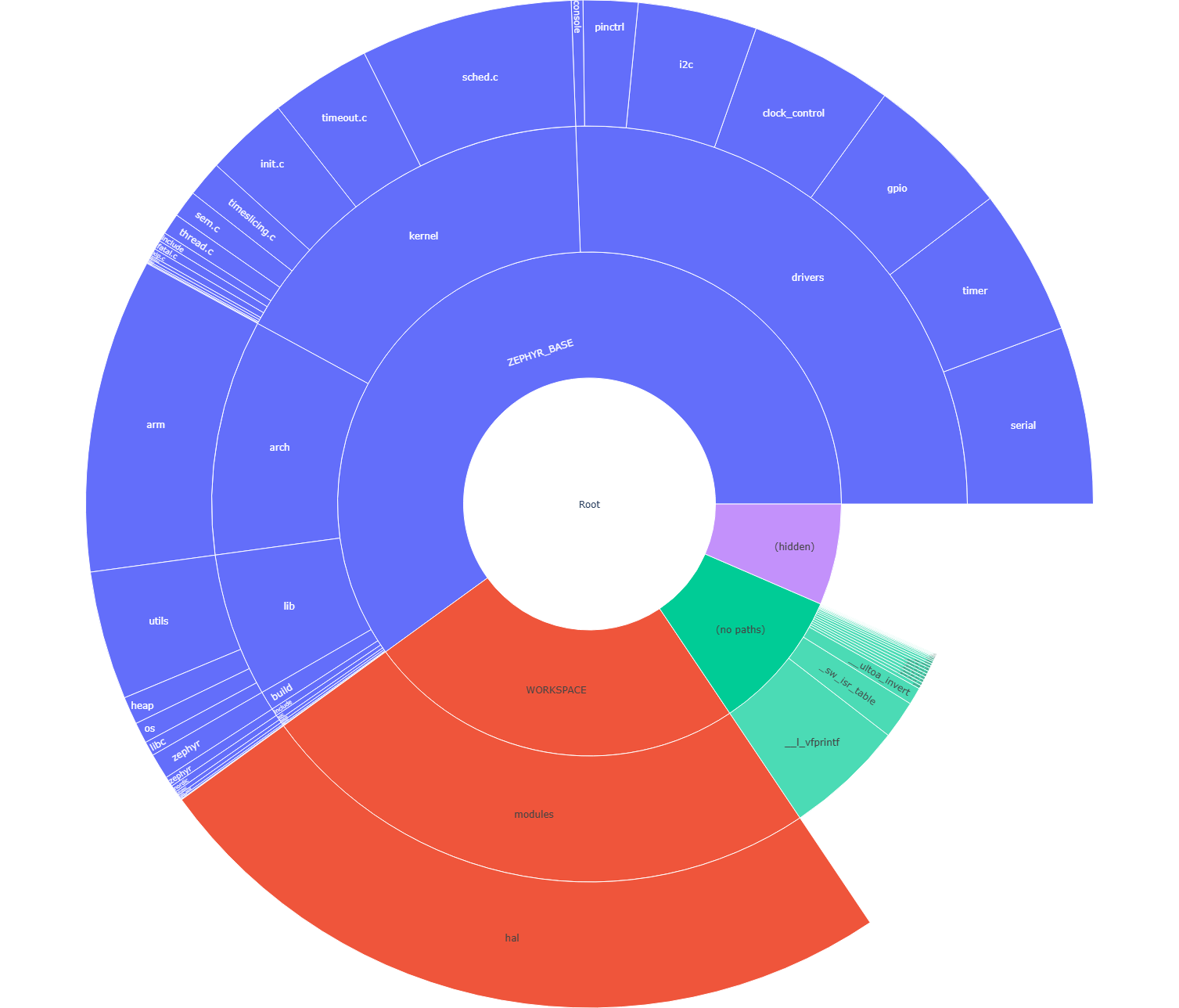
与 ram_report 和 rom_report 构建目标类似,这些目标以旭日图生成可视化内存使用报告。用户可单击扇区浏览目录结构,将鼠标悬停在扇区上查看详细信息。
运行这些目标会先生成命令行报告,再打开浏览器窗口。
Using west:
# From the root of the zephyr repository
west build -b reel_board samples/hello_world
west build -t ram_plot
Using CMake and ninja:
# From the root of the zephyr repository
# Use cmake to configure a Ninja-based buildsystem:
cmake -Bbuild -GNinja -DBOARD=reel_board samples/hello_world

# Now run the build tool on the generated build system:
ninja -Cbuild ram_plot
ROM 使用情况同理。
Using west:
# From the root of the zephyr repository
west build -b reel_board samples/hello_world
west build -t rom_plot
Using CMake and ninja:
# From the root of the zephyr repository
# Use cmake to configure a Ninja-based buildsystem:
cmake -Bbuild -GNinja -DBOARD=reel_board samples/hello_world

# Now run the build tool on the generated build system:
ninja -Cbuild rom_plot
构建目标:puncover
此目标使用名为 puncover 的第三方工具,地址为 https://github.com/HBehrens/puncover。构建该目标会启动本地 Web 服务器,供你通过浏览器查看文件及其 ROM、RAM 和栈占用。
使用此目标之前,安装 puncover Python 模块:
pip3 install --user puncover
警告
这是第三方工具,其可用性可能随时变化。请查看 GitHub 问题,并向项目维护者报告新问题。
安装 Python 模块后,针对所用开发板使用 puncover 目标,如下例所示。如果使用 Sysbuild (System build),请参见 Dedicated image build targets。
Using west:
# From the root of the zephyr repository
west build -b reel_board samples/hello_world
west build -t puncover
Using CMake and ninja:
# From the root of the zephyr repository
# Use cmake to configure a Ninja-based buildsystem:
cmake -Bbuild -GNinja -DBOARD=reel_board samples/hello_world

# Now run the build tool on the generated build system:
ninja -Cbuild puncover
puncover 目标默认在 localhost:5000 启动本地 Web 服务器。可通过环境变量 PUNCOVER_HOST 和 PUNCOVER_PORT 更改 HTTP 服务器的主机 IP 和端口。在 EXTRA_PUNCOVER_ARGS 中可定义并传入其他 puncover 参数。
要在交互式 Web 应用中查看最坏情况下的栈使用分析,构建时启用 CONFIG_STACK_USAGE。
Using west:
# From the root of the zephyr repository
west build -b reel_board samples/hello_world -- -DCONFIG_STACK_USAGE=y -DCONFIG_CALLGRAPH_INFO=y
west build -t puncover
Using CMake and ninja:
# From the root of the zephyr repository
# Use cmake to configure a Ninja-based buildsystem:
cmake -Bbuild -GNinja -DBOARD=reel_board -DCONFIG_STACK_USAGE=y -DCONFIG_CALLGRAPH_INFO=y samples/hello_world

# Now run the build tool on the generated build system:
ninja -Cbuild puncover
如果希望将发现的最坏栈使用情况输出为 JSON 报告而不启动 Web 应用,可添加 --generate-report --non-interactive --report-type json 选项进行非交互式使用。为每个关注的函数添加 --report-max-static-stack-usage FUNCTION_NAME:::MAXIMAL_STACK_SIZE 形式的参数,即可将其纳入报告。例如,导出 log_process_thread_func、shell_thread、bg_thread_main 和 work_queue_main 的命令如下:
Using west:
# From the root of the zephyr repository
west build -b reel_board samples/hello_world -- -DCONFIG_STACK_USAGE=y -DCONFIG_CALLGRAPH_INFO=y -DEXTRA_PUNCOVER_ARGS="--generate-report;--non-interactive;--report-type;json;--report-max-static-stack-usage;log_process_thread_func:::832;--report-max-static-stack-usage;shell_thread:::4160;--report-max-static-stack-usage;bg_thread_main:::2112;--report-max-static-stack-usage;work_queue_main:::1088;--report-filename;$PWD/report"
west build -t puncover
Using CMake and ninja:
# From the root of the zephyr repository
# Use cmake to configure a Ninja-based buildsystem:
cmake -Bbuild -GNinja -DBOARD=reel_board -DCONFIG_STACK_USAGE=y -DCONFIG_CALLGRAPH_INFO=y -DEXTRA_PUNCOVER_ARGS="--generate-report;--non-interactive;--report-type;json;--report-max-static-stack-usage;log_process_thread_func:::832;--report-max-static-stack-usage;shell_thread:::4160;--report-max-static-stack-usage;bg_thread_main:::2112;--report-max-static-stack-usage;work_queue_main:::1088;--report-filename;$PWD/report" samples/hello_world

# Now run the build tool on the generated build system:
ninja -Cbuild puncover
也可将所有参数放入 YAML 配置,便于维护和整体查看:
elf_file: ~/zephyrproject/zephyr/samples/net/mqtt_publisher/build/zephyr/zephyr.elf
gcc-tools-base: ~/zephyr-sdk-1.0.1/gnu/arm-zephyr-eabi/bin/arm-zephyr-eabi-
src_root: ~/zephyrproject/zephyr
build_dir: ~/zephyrproject/zephyr/samples/net/mqtt_publisher/build
generate-report: true
non-interactive: true
report-type: json
report-max-static-stack-usage:
   - log_process_thread_func:::832
   - shell_thread:::4160
   - bg_thread_main:::2112
   - work_queue_main:::1088
   - mgmt_event_work_handler:::896
Using west:
# From the root of the zephyr repository
west build -b reel_board samples/hello_world -- -DCONFIG_STACK_USAGE=y -DCONFIG_CALLGRAPH_INFO=y -DEXTRA_PUNCOVER_ARGS="-c puncover_config.yaml"
west build -t puncover
Using CMake and ninja:
# From the root of the zephyr repository
# Use cmake to configure a Ninja-based buildsystem:
cmake -Bbuild -GNinja -DBOARD=reel_board -DCONFIG_STACK_USAGE=y -DCONFIG_CALLGRAPH_INFO=y -DEXTRA_PUNCOVER_ARGS="-c puncover_config.yaml" samples/hello_world

# Now run the build tool on the generated build system:
ninja -Cbuild puncover
数据结构
构建目标:pahole
Poke-a-hole(pahole)是对象文件分析工具,用于查看数据结构大小,以及编译器将数据元素按 CPU 字长对齐时产生的空洞。
使用此目标前必须安装 Poke-a-hole(pahole)。可从 https://git.kernel.org/pub/scm/devel/pahole/pahole.git 获取;Fedora 和 Ubuntu 的 dwarves 软件包也提供此工具:
sudo apt-get install dwarves
也可以从 Fedora 获取:
sudo dnf install dwarves
安装软件包后,针对所用开发板使用 pahole 目标,如下例所示。如果使用 Sysbuild (System build),请参见 Dedicated image build targets。
Using west:
# From the root of the zephyr repository
west build -b reel_board samples/hello_world
west build -t pahole
Using CMake and ninja:
# From the root of the zephyr repository
# Use cmake to configure a Ninja-based buildsystem:
cmake -Bbuild -GNinja -DBOARD=reel_board samples/hello_world

# Now run the build tool on the generated build system:
ninja -Cbuild pahole
Pahole 会在控制台生成类似以下内容的输出:
/* Used at: [...]/build/zephyr/kobject_hash.c */
/* <375> [...]/zephyr/include/zephyr/sys/dlist.h:37 */
union {
        struct _dnode *            head;               /*     0     4 */
        struct _dnode *            next;               /*     0     4 */
};
/* Used at: [...]/build/zephyr/kobject_hash.c */
/* <397> [...]/zephyr/include/zephyr/sys/dlist.h:36 */
struct _dnode {
        union {
                struct _dnode *    head;                 /*     0     4 */
                struct _dnode *    next;                 /*     0     4 */
        };                                               /*     0     4 */
        union {
                struct _dnode *    tail;                 /*     4     4 */
                struct _dnode *    prev;                 /*     4     4 */
        };                                               /*     4     4 */

        /* size: 8, cachelines: 1, members: 2 */
        /* last cacheline: 8 bytes */
};
/* Used at: [...]/build/zephyr/kobject_hash.c */
/* <3b7> [...]/zephyr/include/zephyr/sys/dlist.h:41 */
union {
        struct _dnode *            tail;               /*     0     4 */
        struct _dnode *            prev;               /*     0     4 */
};
...
...
仪表盘
可以生成 HTML 仪表盘,将各种工具的输出和产物汇集到一个简洁视图中。除构建结果的基本摘要外,还包含以下信息:
完整内存报告(RAM、ROM),提供可逐层展开的表格及 图表,对应
footprint、ram_plot和rom_plot构建目标。Kconfig 符号值及其来源,对应
traceconfig构建目标。初始化级别及函数名,以及系统初始化相对于设备树的优先级问题报告,对应
initlevels构建目标。可浏览的设备树视图,包含属性值及绑定中的详细信息。
针对所用开发板使用 dashboard 目标,如下例所示。如果使用 Sysbuild (System build),请参见 Dedicated image build targets。
Using west:
# From the root of the zephyr repository
west build -b reel_board samples/hello_world
west build -t dashboard
Using CMake and ninja:
# From the root of the zephyr repository
# Use cmake to configure a Ninja-based buildsystem:
cmake -Bbuild -GNinja -DBOARD=reel_board samples/hello_world

# Now run the build tool on the generated build system:
ninja -Cbuild dashboard
这会生成以下输出文件,并在默认浏览器中打开:
build/dashboard/index.html