9 devtool 速查
devtool 命令行工具提供多种功能,帮助构建、测试和打包软件。
它与 bitbake 命令一同提供,也是可扩展 SDK 的关键组成部分。
本章提供 devtool 命令的速查说明。
有关在可扩展 SDK 中使用此命令的更多信息,请参阅《Yocto Project
应用开发与可扩展软件开发工具包(eSDK)手册》的
“使用可扩展 SDK”章。
9 获取帮助
devtool 命令行的组织方式类似 Git,通过多个子命令提供各项功能。
运行 devtool --help 可以查看全部命令:
$ devtool --help
NOTE: Starting bitbake server...
usage: devtool [--basepath BASEPATH] [--bbpath BBPATH] [-d] [-q] [--color COLOR] [-h] <subcommand> ...

OpenEmbedded development tool

options:
  --basepath BASEPATH   Base directory of SDK / build directory
  --bbpath BBPATH       Explicitly specify the BBPATH, rather than getting it from the metadata
  -d, --debug           Enable debug output
  -q, --quiet           Print only errors
  --color COLOR         Colorize output (where COLOR is auto, always, never)
  -h, --help            show this help message and exit

subcommands:
  Beginning work on a recipe:
    add                   Add a new recipe
    modify                Modify the source for an existing recipe
    upgrade               Upgrade an existing recipe
  Getting information:
    status                Show workspace status
    latest-version        Report the latest version of an existing recipe
    check-upgrade-status  Report upgradability for multiple (or all) recipes
    search                Search available recipes
  Working on a recipe in the workspace:
    build                 Build a recipe
    ide-sdk               Setup the SDK and configure the IDE
    rename                Rename a recipe file in the workspace
    edit-recipe           Edit a recipe file
    find-recipe           Find a recipe file
    configure-help        Get help on configure script options
    update-recipe         Apply changes from external source tree to recipe
    reset                 Remove a recipe from your workspace
    finish                Finish working on a recipe in your workspace
  Testing changes on target:
    deploy-target         Deploy recipe output files to live target machine
    undeploy-target       Undeploy recipe output files in live target machine
    build-image           Build image including workspace recipe packages
  Advanced:
    create-workspace      Set up workspace in an alternative location
    import                Import exported tar archive into workspace
    export                Export workspace into a tar archive
    extract               Extract the source for an existing recipe
    sync                  Synchronize the source tree for an existing recipe
    menuconfig            Alter build-time configuration for a recipe
Use devtool <subcommand> --help to get help on a specific command
按照通用帮助输出的提示,指定命令名称并使用 --help,
可以获取该命令的详细语法:
$ devtool add --help
NOTE: Starting bitbake server...
usage: devtool add [-h] [--same-dir | --no-same-dir] [--fetch URI] [--npm-dev] [--no-pypi] [--version VERSION] [--no-git] [--srcrev SRCREV | --autorev]
                   [--srcbranch SRCBRANCH] [--binary] [--also-native] [--src-subdir SUBDIR] [--mirrors] [--provides PROVIDES]
                   [recipename] [srctree] [fetchuri]

Adds a new recipe to the workspace to build a specified source tree. Can optionally fetch a remote URI and unpack it to create the source tree.

arguments:
  recipename            Name for new recipe to add (just name - no version, path or extension). If not specified, will attempt to auto-detect it.
  srctree               Path to external source tree. If not specified, a subdirectory of /media/build1/poky/build/workspace/sources will be used.
  fetchuri              Fetch the specified URI and extract it to create the source tree

options:
  -h, --help            show this help message and exit
  --same-dir, -s        Build in same directory as source
  --no-same-dir         Force build in a separate build directory
  --fetch URI, -f URI   Fetch the specified URI and extract it to create the source tree (deprecated - pass as positional argument instead)
  --npm-dev             For npm, also fetch devDependencies
  --no-pypi             Do not inherit pypi class
  --version VERSION, -V VERSION
                        Version to use within recipe (PV)
  --no-git, -g          If fetching source, do not set up source tree as a git repository
  --srcrev SRCREV, -S SRCREV
                        Source revision to fetch if fetching from an SCM such as git (default latest)
  --autorev, -a         When fetching from a git repository, set SRCREV in the recipe to a floating revision instead of fixed
  --srcbranch SRCBRANCH, -B SRCBRANCH
                        Branch in source repository if fetching from an SCM such as git (default master)
  --binary, -b          Treat the source tree as something that should be installed verbatim (no compilation, same directory structure). Useful with binary packages e.g. RPMs.
  --also-native         Also add native variant (i.e. support building recipe for the build host as well as the target machine)
  --src-subdir SUBDIR   Specify subdirectory within source tree to use
  --mirrors             Enable PREMIRRORS and MIRRORS for source tree fetching (disable by default).
  --provides PROVIDES, -p PROVIDES
                        Specify an alias for the item provided by the recipe. E.g. virtual/libgl
9 工作区层结构
devtool 使用“工作区”层完成构建。
该层不专属于某个 devtool 命令,而是整个工具共用的工作区域。
下图展示工作区结构:
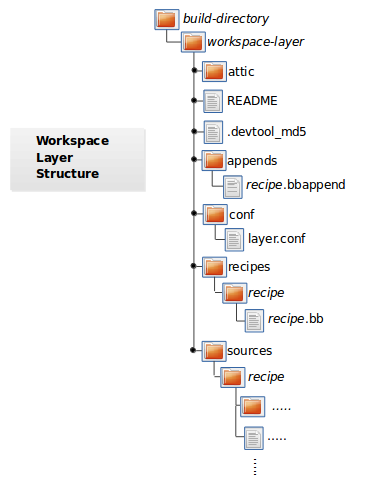
attic - A directory created if devtool believes it must preserve
        anything when you run "devtool reset".  For example, if you
        run "devtool add", make changes to the recipe, and then
        run "devtool reset", devtool takes notice that the file has
        been changed and moves it into the attic should you still
        want the recipe.

README - Provides information on what is in workspace layer and how to
         manage it.

.devtool_md5 - A checksum file used by devtool.

appends - A directory that contains *.bbappend files, which point to
          external source.

conf - A configuration directory that contains the layer.conf file.

recipes - A directory containing recipes.  This directory contains a
          folder for each directory added whose name matches that of the
          added recipe.  devtool places the recipe.bb file
          within that sub-directory.

sources - A directory containing a working copy of the source files used
          when building the recipe.  This is the default directory used
          as the location of the source tree when you do not provide a
          source tree path.  This directory contains a folder for each
          set of source files matched to a corresponding recipe.
9 向工作区层添加新配方
使用 devtool add 向工作区层添加新配方。
该配方应尚不存在,由 devtool 创建。
配方使用的源码文件应已存在于外部位置。
以下示例创建名为 jackson 的新配方,并加入工具创建的工作区层。
配方要构建的源码位于 /home/user/sources/jackson:
$ devtool add jackson /home/user/sources/jackson
添加配方时,如果工作区层尚不存在,命令会创建它, 并按照“工作区层结构”一节填充内容。
如果工作区层已存在,devtool add 会将配方、追加文件和源码文件
加入现有工作区层。创建的 .bbappend 文件指向外部源码树。
备注
如果配方定义了运行时依赖,在尝试运行应用之前, 必须确保目标硬件上已安装这些软件包。 如果目标缺少依赖的软件包(例如库),应用运行时将无法找到相应函数。 更多信息见 “在目标机器上部署软件” 一节。
默认情况下,devtool add 从远程 URI 解包文件时使用最新修订版本,
即 master。有时需要通过分支、标签或提交哈希指定源码修订版本。
可以在 devtool add 中使用以下选项:
使用
--srcbranch指定源码分支:$ devtool add --srcbranch blacksail jackson /home/user/sources/jackson
上例检出 blacksail 分支。
使用
--srcrev指定标签或提交哈希:$ devtool add --srcrev yocto-$DISTRO; jackson /home/user/sources/jackson $ devtool add --srcrev some_commit_hash /home/user/sources/jackson
上例分别检出 yocto-$DISTRO; 标签和 some_commit_hash 对应的提交。
备注
如果希望每次构建配方时都使用最新修订版本,请使用 --autorev 或 -a。
9 提取现有配方的源码
使用 devtool extract 提取现有配方的源码。
必须提供配方的基本名称,不包含版本、路径或扩展名,
并指定源码的提取目标目录。
额外选项可以指定检出源码所用的开发分支名称, 以及是否保留便于调试的临时目录。
9 同步已提取的配方源码树
使用 devtool sync 同步现有配方此前已提取的源码树。
必须提供配方的基本名称,不包含版本、路径或扩展名,
并指定源码的提取目标目录。
额外选项可以指定检出源码所用的开发分支名称, 以及是否保留便于调试的临时目录。
9 修改现有配方
使用 devtool modify 开始修改现有配方的源码。
它与 add 很相似,
但不会在工作区层中实际创建配方,因为配方已存在于其他层中。
devtool modify 提取配方源码;如果源码不是从 Git 获取的,
则将其初始化为 Git 仓库;随后检出开发分支,
并将配方的补丁作为提交应用到该分支之上。
可以使用以下命令检出源码文件:
$ devtool modify recipe
使用上述形式时,devtool 通过现有配方的 SRC_URI
定位上游源码,并将其提取到工作区默认的源码位置。
默认开发分支名为“devtool”。
9 编辑现有配方
使用 devtool edit-recipe,通过 EDITOR 变量指定的默认编辑器
打开指定配方。
使用 devtool edit-recipe 时,必须提供不含版本、路径或扩展名的
配方基本名称。此外,配方文件本身必须已通过 devtool add
或 devtool upgrade 放入工作区。
9 更新配方
使用 devtool update-recipe 将源码修改转换为补丁并更新配方。
例如,准备修改代码时,可以先使用
devtool modify 提取源码并设置工作区,
然后修改、编译和测试代码。
确认结果符合预期并将修改提交到 Git 仓库后,
可以运行 devtool update-recipe 创建补丁并更新配方:
$ devtool update-recipe recipe
如果未提交修改就运行 devtool update-recipe,该命令会忽略这些修改。
通常,你可能希望将软件定制保存在自己的层中,而不是修改原配方。
此时可以为 devtool update-recipe 使用 -a 或 --append,
指定将追加文件写入哪个层:
$ devtool update-recipe recipe -a base-layer-directory
*.bbappend 会创建在指定层目录中的适当位置,
该层不一定已列入 build/conf/bblayers.conf。
如果追加文件已存在,命令会相应地更新它。
9 检查配方的升级状态
上游配方随时间变化,因此有时需要判断配方是否可以升级到新版本。
使用 devtool latest-version recipe 可以快速查看配方当前版本
和上游可用的最新版本。若需整体了解,可使用 devtool check-upgrade-status,
传入配方列表;不带参数时会检查所有可用配方。
该命令只输出存在上游新版本的配方,并以表格显示当前版本、上游最新版本、
维护者邮箱,以及提交哈希或无法升级的原因等附加信息。
升级检查机制依赖配方中可选的 UPSTREAM_CHECK_URI、 UPSTREAM_CHECK_REGEX、UPSTREAM_CHECK_GITTAGREGEX、 UPSTREAM_CHECK_COMMITS 和 UPSTREAM_VERSION_UNKNOWN 变量。
备注
多数情况下不需要上述变量。只有上游采用特殊方式, 导致默认机制无法发现新版本时才需要设置。
对于
oe-core层,配方维护者信息来自 maintainers.inc 文件。如果配方使用 Git Fetcher (git://) 而非压缩包,提交哈希指向与最新版本标签匹配的提交。 如果没有合适标签,且配方中 UPSTREAM_CHECK_COMMITS 设为
1, 则指向最新提交。
与其他 devtool 命令一样,可以获取此命令的帮助:
$ devtool check-upgrade-status -h
NOTE: Starting bitbake server...
usage: devtool check-upgrade-status [-h] [--all] [recipe [recipe ...]]

Prints a table of recipes together with versions currently provided by recipes, and latest upstream versions, when there is a later version available

arguments:
  recipe      Name of the recipe to report (omit to report upgrade info for all recipes)

options:
  -h, --help  show this help message and exit
  --all, -a   Show all recipes, not just recipes needing upgrade
除非在命令行中指定配方名称,否则命令会检查所有已配置层中的全部配方。
以下展示检查全部配方时输出表格的一部分:
$ devtool check-upgrade-status
...
INFO: bind                      9.16.20         9.16.21         Armin Kuster <akuster808@gmail.com>
INFO: inetutils                 2.1             2.2             Tom Rini <trini@konsulko.com>
INFO: iproute2                  5.13.0          5.14.0          Changhyeok Bae <changhyeok.bae@gmail.com>
INFO: openssl                   1.1.1l          3.0.0           Alexander Kanavin <alex.kanavin@gmail.com>
INFO: base-passwd               3.5.29          3.5.51          Anuj Mittal <anuj.mittal@intel.com>  cannot be updated due to: Version 3.5.38 requires cdebconf for update-passwd utility
...
注意 base-passwd 配方未升级的原因。
上例中虽然上游有新版本,但因难以满足对 cdebconf 的依赖而不采用。
维护者可以在对应配方中添加 RECIPE_NO_UPDATE_REASON,
明确给出显示的原因。示例见
base-passwd_*.bb 配方:
RECIPE_NO_UPDATE_REASON = "Version 3.5.38 requires cdebconf for update-passwd utility"
如果当前无法确定配方的最新上游版本,
可以将其 UPSTREAM_VERSION_UNKNOWN 设为 1。
9 升级配方
随着软件发展,上游配方会升级到新版本。
开发者需要使本地配方跟上上游发布。
配方有多种升级方式,见《Yocto Project 开发任务手册》的
“升级配方”一节。
本节概述 devtool upgrade 命令。
升级之前可以检查配方的升级状态, 详情见“检查配方的升级状态”一节。
devtool upgrade 将现有配方升级到上游的较新版本。
命令把升级后的配方及关联文件放入工作区,并在需要时将源码树提取到指定位置。
升级期间,会根据需要对配方补丁变基或添加补丁。
使用 devtool upgrade 时,必须提供不含版本、路径或扩展名的
配方基本名称,并指定源码提取目录。
额外选项可以控制目标版本号(PV)、目标源码修订版本
(SRCREV)、是否应用补丁等。
有关 devtool upgrade 工作流程的更多信息,请参阅《Yocto Project
应用开发与可扩展软件开发工具包(eSDK)手册》的
“使用 devtool upgrade 创建支持新版软件的配方”
一节。使用示例还可参阅《Yocto Project 开发任务手册》的
“使用 devtool upgrade”一节。
9 重置配方
使用 devtool reset 从工作区层中移除配方及其配置,
例如对应的 .bbappend 文件。
该命令会删除配方和追加文件,并不会替你移动它们。
因此,在运行之前,务必先将更新后的配方和追加文件移到工作区层之外。
如果 devtool reset 发现配方或追加文件已修改,
会将修改后的文件保存在工作区层的独立“attic”子目录中。
以下示例重置工作区中的 mtr 配方:
$ devtool reset mtr
NOTE: Cleaning sysroot for recipe mtr...
NOTE: Leaving source tree /home/scottrif/bitbake-builds/build/workspace/sources/mtr as-is; if you no longer need it then please delete it manually
$
9 完成配方工作
使用 devtool finish 将已提交的修改应用到指定层中的指定配方,
并将该配方从工作区移除。
这大致相当于先执行 devtool update-recipe,再执行 devtool reset。
修改必须已提交到 devtool 创建的 Git 仓库。例如:
$ devtool finish recipe /path/to/custom/layer
9 构建配方
使用 devtool build 构建配方。
此命令等同于 bitbake -c populate_sysroot。
使用 devtool build 时,必须提供不含版本、路径或扩展名的配方基本名称。
可以使用 -s 或 --disable-parallel-make 禁用构建中的并行 make。
例如:
$ devtool build recipe
9 构建镜像
使用 devtool build-image 构建镜像,并扩展其内容,
纳入工作区配方生成的软件包。
如果需要立即部署到设备上测试的镜像,此命令很有用。
要正式集成到最终镜像中,则需要相应编辑自己的镜像配方。
使用 devtool build-image 时必须提供镜像名称,
此命令没有命令行选项:
$ devtool build-image image
9 在目标机器上部署软件
使用 devtool deploy-target 将配方构建输出部署到正在运行的目标机器:
$ devtool deploy-target recipe target
target 是目标机器地址,格式为 user@hostname[:destdir]。
目标必须运行 SSH 服务器。
此命令部署 do_install 期间安装的全部文件。 目标机器无需启用软件包管理;即使启用了,也会绕过软件包管理器。
备注
deploy-target 仅用于开发,绝不应使用它更新将用于生产环境的镜像。
某些情况会导致已部署应用无法按预期运行。 当以下两个条件同时成立时,应用在目标上可能运行异常:
正在向目标部署新应用,且构建应用的配方已正确定义运行时依赖。
目标实际上未安装应用依赖的软件包。
如果这两个条件同时成立,应用就无法按预期运行。
原因是 devtool deploy-target 不会部署新应用依赖的软件包,例如库,
而是假定它们已经在目标上。因此,应用在运行时调用依赖函数,
例如库函数时,将无法找到该函数。
警告
运行时依赖可以显式列在 RDEPENDS 中,也可能由应用配方中的
DEPENDS 赋值产生。常见情况是应用编译时依赖某些库,
这些库作为构建时依赖列在 DEPENDS 中。
如果它们安装了应用运行时动态链接的共享对象,例如以 .so 结尾的共享库,
则同时也是运行时依赖。
这些运行时依赖由 OpenEmbedded Build System 在打包阶段自动解析。
devtool 忽略打包依赖,因此 devtool deploy-target 不会自动安装它们。
有关 OpenEmbedded Build System 如何处理打包的更多信息, 请参阅《Yocto Project 概览与概念手册》的 自动添加运行时依赖 一节。
为确保目标具备全部依赖,在尝试运行应用之前, 需要先将依赖的软件包部署并安装到目标上。
9 从目标机器移除软件
使用 devtool undeploy-target 从目标机器删除已部署的构建输出。
此命令要求此前已使用
“devtool deploy-target”
部署过这些内容:
$ devtool undeploy-target recipe target
target 为目标机器地址,格式为 user@hostname,目标必须运行 SSH 服务器。
9 在其他位置创建工作区层
使用 devtool create-workspace 在 Build Directory 中
创建新的工作区层。新层最初只包含 README 文件和 conf 目录。
以下示例在当前工作目录创建新的工作区层,默认名为“workspace”:
$ devtool create-workspace
向命令提供路径,即可在任意位置创建工作区层。 以下命令创建名为“new-workspace”的新工作区层:
$ devtool create-workspace /home/scottrif/new-workspace
9 获取工作区配方状态
使用 devtool status 列出工作区中的配方,
输出信息包括各自的外部源码树路径。
devtool status 没有命令行选项:
$ devtool status
以下是在使用
devtool add
创建 mtr_0.86.bb 并加入 workspace 目录后的输出示例:
$ devtool status
mtr:/home/scottrif/bitbake-builds/build/workspace/sources/mtr (/home/scottrif/bitbake-builds/build/workspace/recipes/mtr/mtr_0.86.bb)
$
9 搜索可用的目标配方
使用 devtool search 搜索可用的目标配方。
它匹配配方名称、软件包名称、描述和已安装文件,
找到匹配后显示配方名称。
使用 devtool search 时必须提供关键词,命令按该关键词搜索匹配项。
也可以用 devtool find-recipe 搜索配方文件而不是配方名称,
同样必须提供关键词。
9 获取配方配置脚本信息
使用 devtool configure-help 获取指定配方的配置脚本选项帮助。
必须提供配方名称。例如,对于基于 autotools
的配方,它显示 ./configure --help 的输出。
configure-help 还会显示当前使用的配置选项,
包括通过 EXTRA_OECONF 传递的选项。
9 为配方生成 IDE 配置
devtool ide-sdk 自动创建用于开发指定配方的 IDE 配置和 SDK。
根据 --mode 参数,生成不同类型的 SDK:
modified模式:创建 SDK,并在工作区目录生成 IDE 配置。shared模式:创建交叉编译工具链, 以及所指定配方对应的共享系统根目录。
--target 可以指定 username@hostname 字符串,
并为配方创建远程调试配置。与 devtool deploy-target 一样,
它要求目标运行 SSH 服务器。
有关 devtool ide-sdk 的更多详情,请参阅《Yocto Project 应用开发
与可扩展软件开发工具包(eSDK)手册》的“使用可扩展 SDK”章。